


TeslaMirror
2.997.00 Reviews
App Specs
- Version
- 9.68
- Updated On
- License
- $5.99
- Downloads
- 10,000+
- Developer
- Hustmobile
- Categories
- Auto & Vehicles
- Platform
- Android
Screenshots
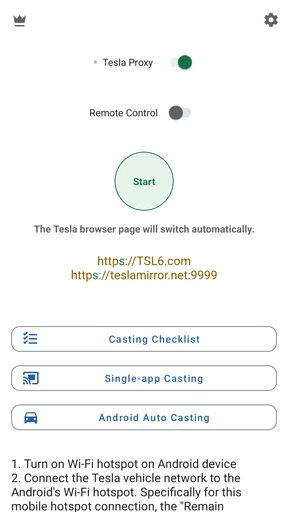
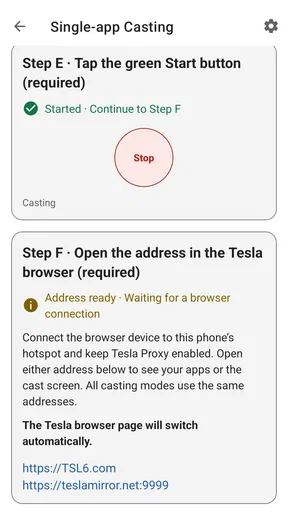
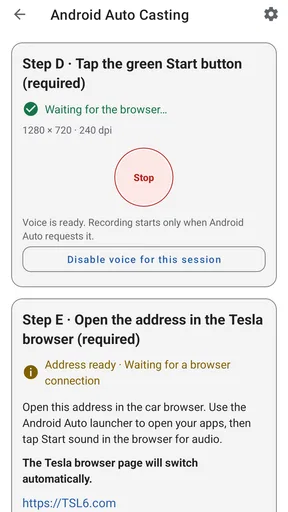
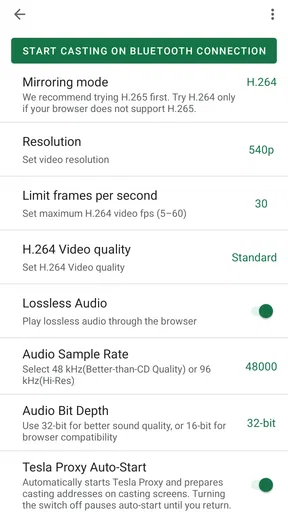
 Analysis by AppCompare
I’d judge TeslaMirror by one practical question: do you want to use a Tesla’s browser to view content on the car’s display, or are you mainly looking for a better way to manage the vehicle? Those needs sound similar, but they point to different tools. TeslaMirror is an Auto & Vehicles app from Hustmobile whose purpose is to mirror content through a Tesla car’s browser. That narrow focus is useful if it matches your routine, but it’s not a reason on its own to install another app.
Before paying, I’d also consider how often you’d actually use the browser while parked and whether mirroring solves a problem your phone already handles. The app costs $5.99, so the decision is less about trying a free utility and more about whether this particular workflow is worth paying for. If you only want vehicle controls or battery information, I’d first look at the tools intended for those tasks rather than assume a browser-mirroring app provides them.
Start with the browser workflow
The key distinction is that this is an app for app mirroring through a Tesla browser, not a general promise that every phone screen, car function, or driving task can be moved into the vehicle. I’d approach it as a way to bring suitable phone content to the car’s browser, then decide whether that convenience matters in the places you normally park. That expectation keeps the purchase grounded and helps avoid treating “mirroring” as a blanket substitute for the car’s own interface.
A useful test is to name one thing you would want to view before installing it: perhaps a page you usually check on your phone while waiting in the car. If you can’t identify a repeatable use, the novelty may wear off quickly. If you can, think through the whole sequence—getting the car ready, opening its browser, starting the mirror, and stopping when you’re done. The value depends on that routine feeling easier than simply using the phone.
Where TeslaMirror can earn its place
The strongest case is a parked-car situation where you already want a larger in-car viewing surface and the browser is a natural place to use it. For example, if I arrive early for an appointment and want to look over a page on the car’s display while waiting, mirroring could save me from holding the phone the whole time. That’s a modest benefit, but a believable one: it makes the car browser more useful without asking the app to replace the vehicle’s controls.
It may also suit someone who regularly pauses during errands or a commute and wants the same phone content available in the car. The important trade-off is that this is most compelling when you’re stationary and have time to set it up. If you need something instantly, or you’re trying to use a screen while driving, the extra step is the wrong kind of convenience. I’d keep any setup and viewing to a safe parked moment.
What it is not—and when another option fits better
Compared with ordinary phone-to-car options, TeslaMirror has a specific angle: it uses the Tesla browser rather than simply sending audio through a familiar connection or relying on a built-in vehicle feature. That distinction can matter if your goal is browser-based viewing. It matters much less if you only need music, directions, or standard vehicle access; for those jobs, the usual phone, car, or manufacturer tools are the simpler category to consider.
Worth Reading Before You Choose

EA SPORTS FC Mobile 26 Is a Bigger Football Game, but It Takes Time

Flipboard Shows What News Apps Must Do Beyond the Feed

Switching to Android Auto Means Rethinking Your Driving Routine

Google Calendar Makes a Crowded Week Easier to Manage

Ludo King Makes the Most of the Minutes Between Plans

Baby Panda World Brings Quick Play to Modern Phones, but Its Game Library Feels Busy
I wouldn’t choose it as a remote-control app based only on the idea of seeing a car screen on a phone. Nor would I assume it can mirror every app or handle every type of content. The description centers on browser mirroring, so I’d make the purchase decision around that use rather than expect broad device casting. If your priority is controlling climate, checking vehicle status, or managing charging, look for a tool whose stated purpose is that specific task.
It is also not the best fit for someone who rarely uses the Tesla browser, dislikes app setup, or wants a free solution. A normal phone screen is often faster for a quick check, while the car’s own interface remains the obvious choice for functions it already handles. TeslaMirror makes more sense when the browser itself is where you want the content to appear—not simply because you own a Tesla.
Small practical checks before you rely on it
Because the workflow involves a phone and a car browser, I’d treat connection and compatibility as things to verify in my own setup rather than assume they will be identical for everyone. Before depending on it for a time-sensitive situation, I’d try it while parked, confirm that the content I care about appears legibly, and check that I can end the session without fuss. That first low-pressure test can reveal whether the process is genuinely convenient for you.
One non-obvious point is to distinguish a successful first launch from a reliable habit. A mirror that works once may still feel cumbersome if you need to repeat several steps every time. I’d notice which parts of the routine require attention and whether the car browser returns to a useful state afterward. If setup feels fiddly, the phone may remain the more practical screen even if mirroring technically works.
I’d also be selective about what I display. A larger screen can make content easier to read, but it doesn’t make every phone activity appropriate in a vehicle. Keep the use to parked moments and content that makes sense to view in that setting. That’s a better way to get the convenience without turning a display feature into a distraction.
Price, confidence, and the cost of switching
At $5.99, this is a paid utility rather than an automatic buy. The app has a 2.9 average from around 250 ratings, with roughly 90 written reviews, so I’d go in cautiously rather than treat it as a polished essential. That score doesn’t tell me whether it will work in a particular car-and-phone setup, but it does make a personal trial more important: the value depends heavily on whether the mirroring workflow suits you.
There are over 10,000 installs, and the app is rated for Everyone. It was released on December 30, 2020, and its current version is 9.64, with Android 8.0 as the minimum system requirement. Those details help set expectations about availability and device eligibility, but they don’t replace checking that your own phone and the Tesla browser behave as you need. I’d confirm the basics before building a regular routine around it.
Switching from your normal habits has a small but real cost: you need to remember another app, learn its launch sequence, and decide when browser mirroring is worth the extra step. If you only use it occasionally, that overhead may outweigh the larger-screen benefit. If you have a repeated parked-car use, the routine can become easier to justify. I’d pay only if I could name that recurring moment in advance.
Who should try it—and who should pass
I’d recommend considering TeslaMirror if you own a Tesla, often use its browser while parked, and have a clear reason to bring phone content onto that screen. It is a particularly sensible candidate for someone who already knows what they want to view and would rather use the in-car display than hold a phone. I’d skip it if your main goal is ordinary vehicle management, if you rarely use the browser, or if a phone display already solves the problem comfortably.
The developer is Hustmobile, and the app is listed in the auto and vehicle category. Its focused purpose is both its appeal and its limitation: it doesn’t need to be a universal car companion to be worthwhile, but it does need to fit a specific browser-based habit. I’d treat it as a targeted convenience, not a must-have accessory for every Tesla owner.
Have you ever wished you could access your Tesla’s screen on your phone? Well, TeslaMirror is here to make that dream a reality. I recently took this app for a spin, and let me tell you, it’s a pretty neat piece of tech. Stick around as I dive into my experience with this app, which promises to bridge the gap between your Tesla and your smartphone.
What is TeslaMirror?
At its core, TeslaMirror is an app designed to mirror your Tesla’s display directly to your smartphone. It’s like having your car’s interface right in your pocket. This app is available for both Android and iOS, making it accessible to a wide range of users. The main appeal? You can control various features without even being inside your vehicle!
Setting Up TeslaMirror
Setting up the app was surprisingly straightforward. After downloading the app, I was prompted to connect it to my Tesla account. The process was secure and required authentication, which gave me peace of mind. Within minutes, I had the app up and running, ready to explore its features.
Features That Stand Out
One of the most impressive features is the real-time mirroring. The app reflects the Tesla's screen onto your phone with minimal lag. Whether you want to check the navigation or adjust climate control, it’s all right there.
Another cool feature is the ability to control the media player. You can switch songs or adjust the volume without taking your eyes off the road. It’s a small feature, but it makes a big difference in terms of convenience and safety.
The app also lets you monitor your car’s stats. I could check the battery level, range, and even the tire pressure. It’s like having a mini dashboard on your phone!
User Experience
The app interface is sleek and user-friendly. Navigating through the options is intuitive, and the layout mirrors the Tesla’s own interface closely. I appreciated the attention to detail here, as it made the transition from car to phone seamless.
However, I did notice that the app could be a bit power-hungry. Using the app for extended periods drained my phone’s battery faster than usual. It’s something to keep in mind if you plan on using it while away from a charger.
Security Considerations
Security is always a top priority with apps that access personal vehicles. The developers of TeslaMirror seem to have taken this seriously. The app requires authentication, and it’s clear that they’ve implemented robust security measures to protect user data.
Still, it’s crucial to keep your login credentials secure and regularly update your passwords to prevent unauthorized access.
Final Thoughts
All in all, TeslaMirror is a fantastic app for Tesla owners who want more flexibility and control over their vehicles. The ability to mirror your car’s screen to your phone is not just a gimmick; it genuinely enhances the driving experience. Despite the minor issue with battery consumption, the convenience and ease of use it offers far outweigh the downside.
If you’re a Tesla owner looking to extend your car’s capabilities beyond the dashboard, give TeslaMirror a try. It might just become an indispensable part of your driving routine.
Pros
- Seamless integration with Tesla vehicles.
- High-quality screen mirroring capability.
- User-friendly interface design.
- Supports multiple media formats.
- Regular updates for improved performance.
Cons
- Requires stable internet connection.
- Limited compatibility with older models.
- Setup can be a bit complex initially.
- Consumes significant battery power.
- Some features require premium purchase.
FAQs for TeslaMirror
What is TeslaMirror and how does it work?
TeslaMirror is an innovative app designed to mirror your smartphone's display onto your Tesla's infotainment screen. By establishing a connection via Bluetooth or Wi-Fi, it allows you to access apps, media, and more directly from your car's screen, enhancing your driving experience with seamless integration.
Is TeslaMirror compatible with all Tesla models?
TeslaMirror is compatible with most Tesla models that feature the required infotainment system capabilities. However, it's essential to check the app's compatibility list on their website or within the app store description to ensure it supports your specific Tesla model and software version.
Does using TeslaMirror affect my Tesla’s warranty?
Using TeslaMirror should not affect your Tesla’s warranty, as it is a software application that does not require physical alterations to your vehicle. However, it’s always wise to consult with Tesla support or a certified technician if you have concerns about software interactions with your vehicle.
How secure is the TeslaMirror app?
TeslaMirror employs robust security protocols to protect your data. The app ensures secure connections between your smartphone and Tesla, minimizing risks of unauthorized access. However, it’s always recommended to download it from official app stores to avoid counterfeit versions that might compromise security.
Are there any subscription fees or in-app purchases in TeslaMirror?
TeslaMirror is available as a one-time purchase or a subscription model, depending on the features you wish to access. Some advanced features or future updates may require additional fees. It’s best to review the pricing details in the app store before downloading to understand any potential costs.


